
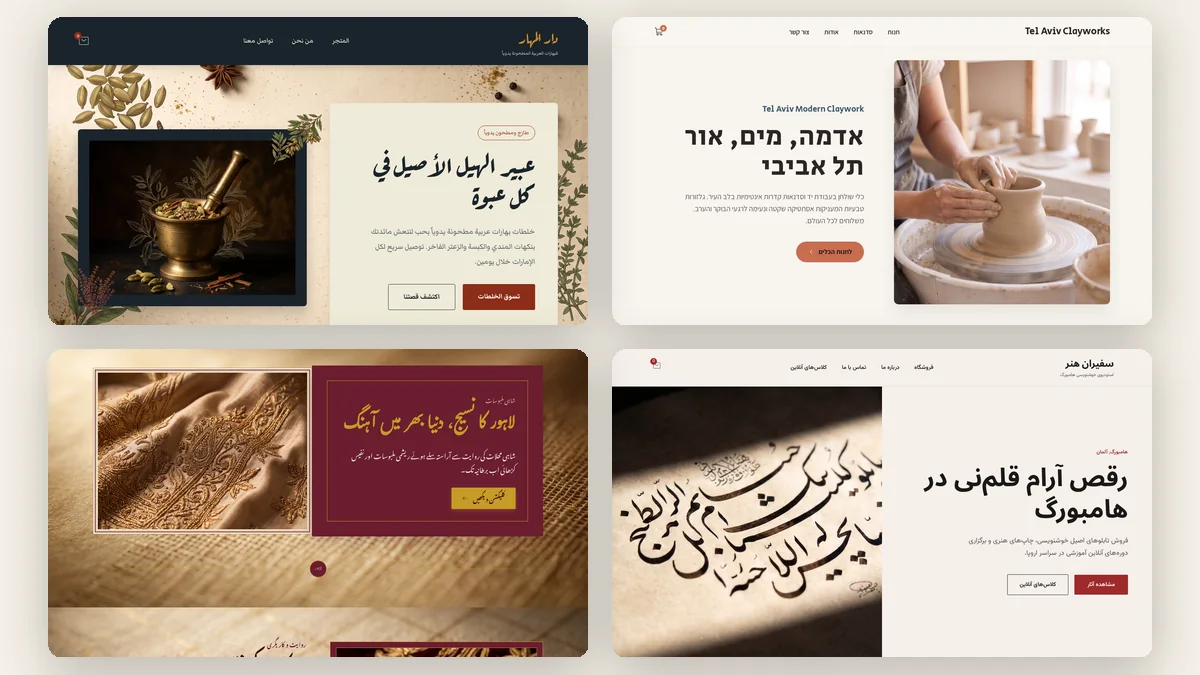
Hebrew, Arabic, Persian and Urdu are written from right to left. A business site in any of them has to read that way on every screen, from the first headline to the last footer link, or a visitor feels that something is off within half a second.
This guide is for business creators in Israel, the Gulf, North Africa, Pakistan and everywhere else people read from right to left. You describe your business in your own language. WPMaven creates it, runs it and grows it, and every page it builds reads the way your customers read. The screens below come from four sites WPMaven built, one per language, each from a single description.
We made up the four businesses for this guide: a ceramics studio in Tel Aviv, a spice seller in the UAE, a calligraphy studio in Hamburg and an embroidery brand in Lahore. Their reviews are invented too, and each page says so.
In your language
The idea of this guide, in each of the four languages.
פותחים עסק בישראל? תארו אותו בעברית, בכמה משפטים. WPMaven יוצרת את העסק ואת האתר שלו, מנהלת אותו ומצמיחה אותו. האתר נקרא מימין לשמאל, מהמסך הראשון ועד האחרון, כולל התפריט בטלפון.
هل تبدأ مشروعك الخاص؟ صف عملك بالعربية في جملة أو جملتين، وتتولى WPMaven إنشاءه وإدارته وتنميته. يُبنى الموقع من اليمين إلى اليسار، من الشاشة الأولى حتى الأخيرة، بما في ذلك قائمة الهاتف.
کسبوکار خود را راهاندازی میکنید؟ آن را در یکی دو جمله به فارسی توضیح دهید. WPMaven کسبوکار و سایت شما را میسازد، اداره میکند و رشد میدهد. سایت از راست به چپ ساخته میشود، از اولین صفحه تا آخرین صفحه، با منوی گوشی.
کیا آپ اپنا کاروبار شروع کر رہے ہیں؟ اسے ایک دو جملوں میں اردو میں بیان کریں۔ WPMaven آپ کا کاروبار اور اس کی ویب سائٹ بناتا ہے، اسے چلاتا ہے اور بڑھاتا ہے۔ ویب سائٹ دائیں سے بائیں پڑھی جاتی ہے، پہلی اسکرین سے آخری اسکرین تک، فون کے مینو سمیت۔
What a right to left website means
Open a site in Hebrew or Arabic and notice where your eye goes first. It goes to the right. The logo is there, the first menu item is there, the headline starts there and the first card of a row waits there. Everything after that is laid out in the order a reader of Hebrew, Arabic, Persian or Urdu expects.
A site that translates the words and leaves the layout alone feels foreign in half a second, even to a visitor who could not say why. The text is Hebrew, but the menu starts on the wrong side, the arrows point the wrong way and the buttons come in the wrong order. Right to left support, often shortened to RTL, is the work of getting many small decisions like these right, on every screen.
WPMaven builds sites that read right to left from the start. Every page carries the reading direction of its language, from the home screen to the last page, and the layout follows from it: rows, grids and lines of text start on the right by themselves. Generating interfaces from models is what I studied for my PhD, and direction is one of the first places a generated interface shows its seams. I care about this detail more than most.
Hebrew: creating a business in Israel
Hebrew sites mix in English all the time: brand names, product words, phone numbers and prices. A ceramics studio in Tel Aviv writes its headline in Hebrew, its brand name in Latin letters, its phone number in digits and its prices with a currency sign, and all of that sits in the same line. The line still has to read right to left.
The sample is Tel Aviv Clayworks: handmade tableware, gift sets and pottery workshops by reservation, shipping worldwide. We wrote one Hebrew description of it, and WPMaven built the site from that.
The home screen
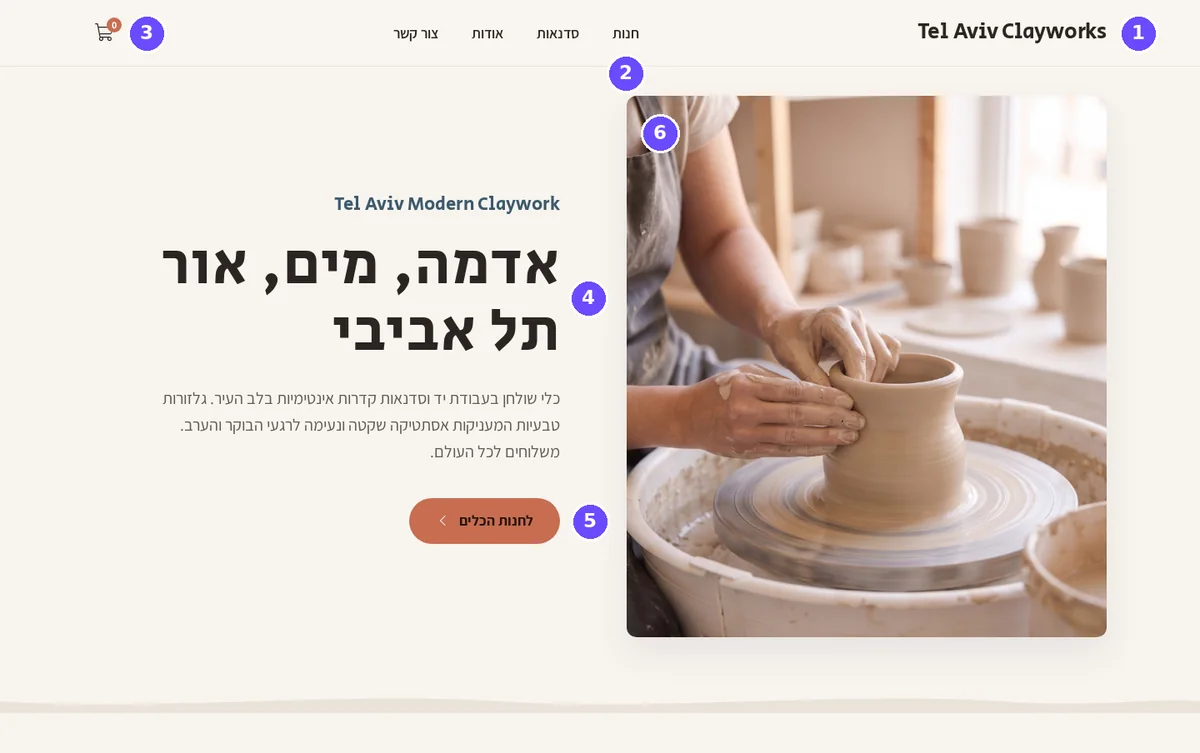
- The brand name, in Latin letters, sits on the right, where a Hebrew reader starts.
- The menu starts at the right: חנות (shop) is its first item, so it is the rightmost.
- The cart sits at the left end of the header.
- The headline, אדמה, מים, אור תל אביבי (earth, water, Tel Aviv light), and the text under it are right aligned.
- The arrow in the button points left, toward where the reader goes next.
- This design puts the photo first, so it takes the right column and the text follows on its left. Whatever comes first goes to the right.
For business creators in Israel this is the part that matters most. You describe your business the way you would explain it to a friend, in Hebrew, and the first screen you see already reads from the right.
The phone, menu first
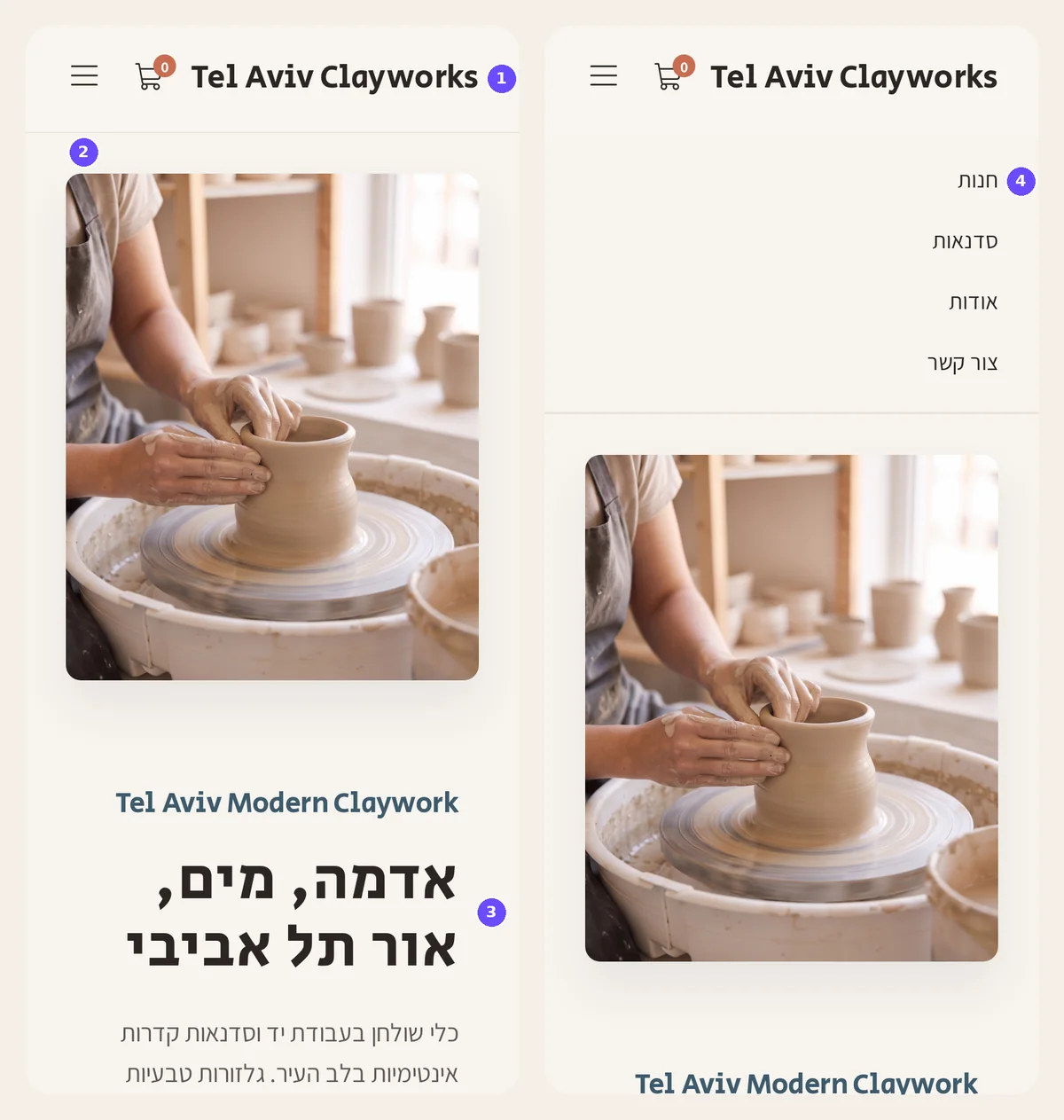
- The brand name stays on the right.
- The menu button and the cart sit on the left.
- The headline and the text under it start at the right.
- Opened, the menu lists its items from the right edge, in the same order as on the desktop.
Most visitors will meet your site on a phone, and a menu button pushed past the edge of the screen is a menu nobody can open. The builder checks the header at phone width on every build: the button must be on screen, the open panel must sit fully inside it and it must close again.
Phone numbers, email addresses and opening hours
A contact page is where Hebrew meets Latin letters and digits in the same line. This is where a right to left page most often goes wrong.
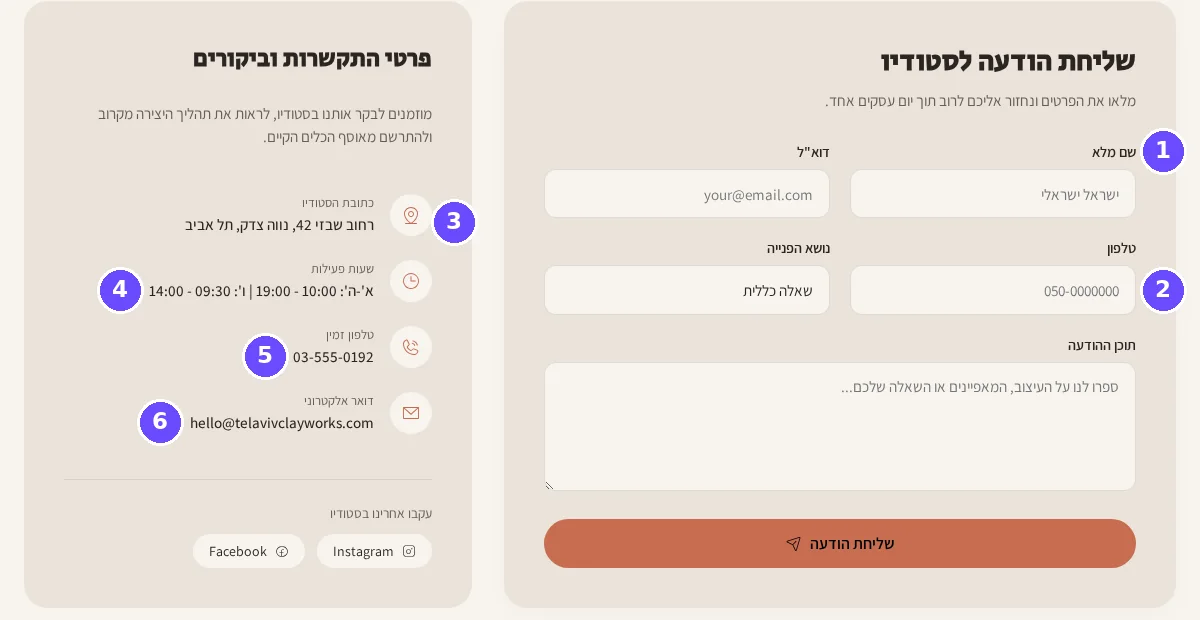
- Labels start at the right edge, above their fields, and the first field of a row is the rightmost.
- Phone and email fields keep their own direction: the example text reads left to right and sits against the right edge, like the rest of the form.
- Each detail starts with its icon on the right, and the text follows.
- The opening hours use the Hebrew letters for the days, and the hours read in the order a Hebrew reader expects.
- The phone number is held in its own left to right box, so its groups stay in order.
- The email address reads left to right, aligned with the rest of the right aligned text.
A phone number written in groups reads backward on a right to left page. Here is the same number twice, as a browser lays it out in a right to left line:
Workshops, prices and booking
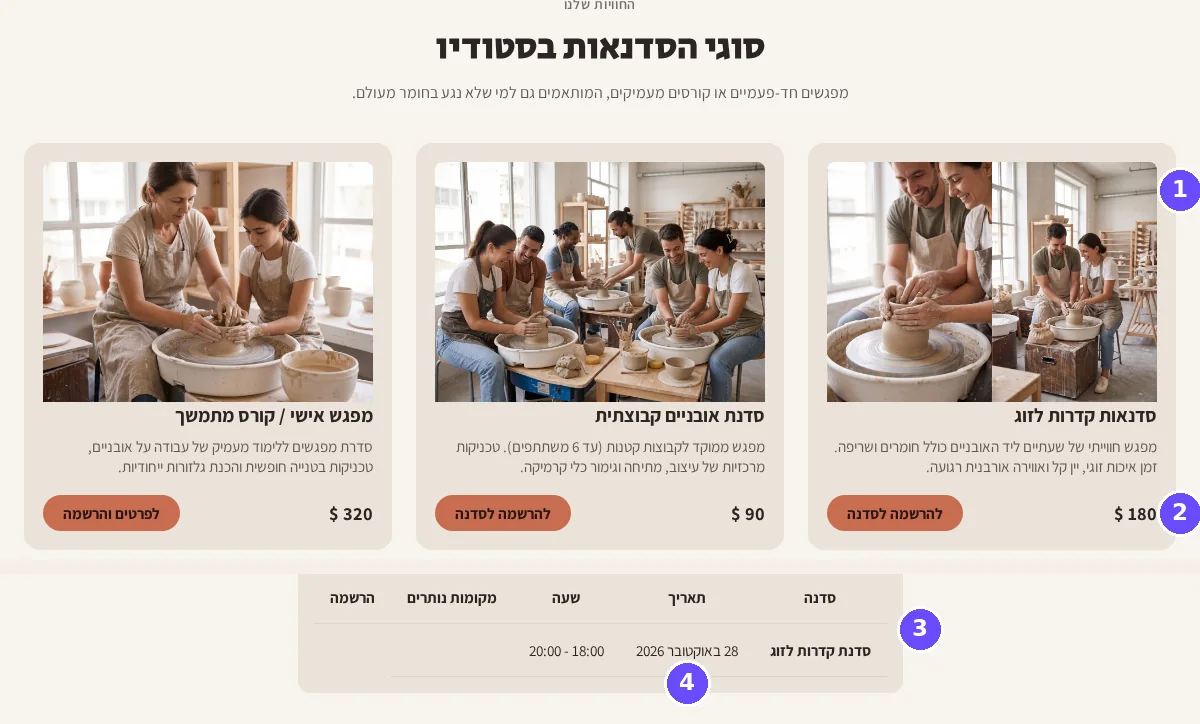
- The first card of the row, the workshop for two, is on the right.
- The price sits at the right end of the row, and the button follows to its left.
- The first column of the schedule, the workshop name, is the rightmost, then the date, the time and the seats.
- The date is written the way a Hebrew reader says it: day, month name, year.
If you are creating a business in Israel, write your description in Hebrew, with Latin brand names and English product words wherever you would use them. Each Latin name stays readable inside the Hebrew line, and the sentence keeps flowing from the right. Not sure what to offer first? Read how to decide what to sell first.
Have a business in mind?
Describe it in Hebrew, in one sentence, and watch it get built, free. Then $1 for your first week, one time only.
Build my business freeArabic: a spice seller in the UAE
The Arabic sample is Dar Al Mahar, a spice seller in the UAE: spice blends ground by hand, delivered across the Emirates. It gives direction plenty to show, because spice names, weights, prices and product codes all sit in the same lines. WPMaven built it from one Arabic description.
The home screen
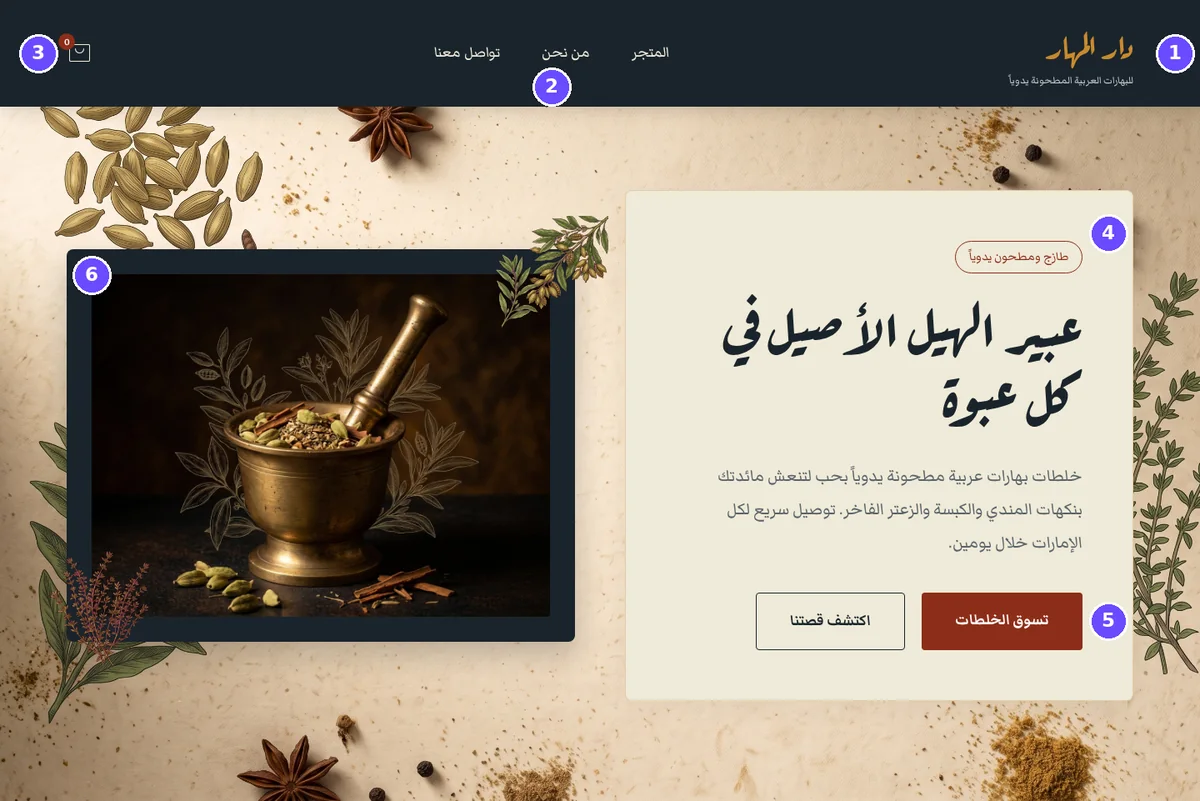
- The logo sits on the right, where an Arabic reader starts.
- The menu runs from the right: its first item is the rightmost one.
- The cart icon moves to the left end of the header.
- The headline and the text under it start at the right edge of their column.
- The main button comes first, on the right. The second button follows on its left.
- The photo takes the left side. In an English version of this layout it would be on the right, with the text on the left.
The phone, menu first
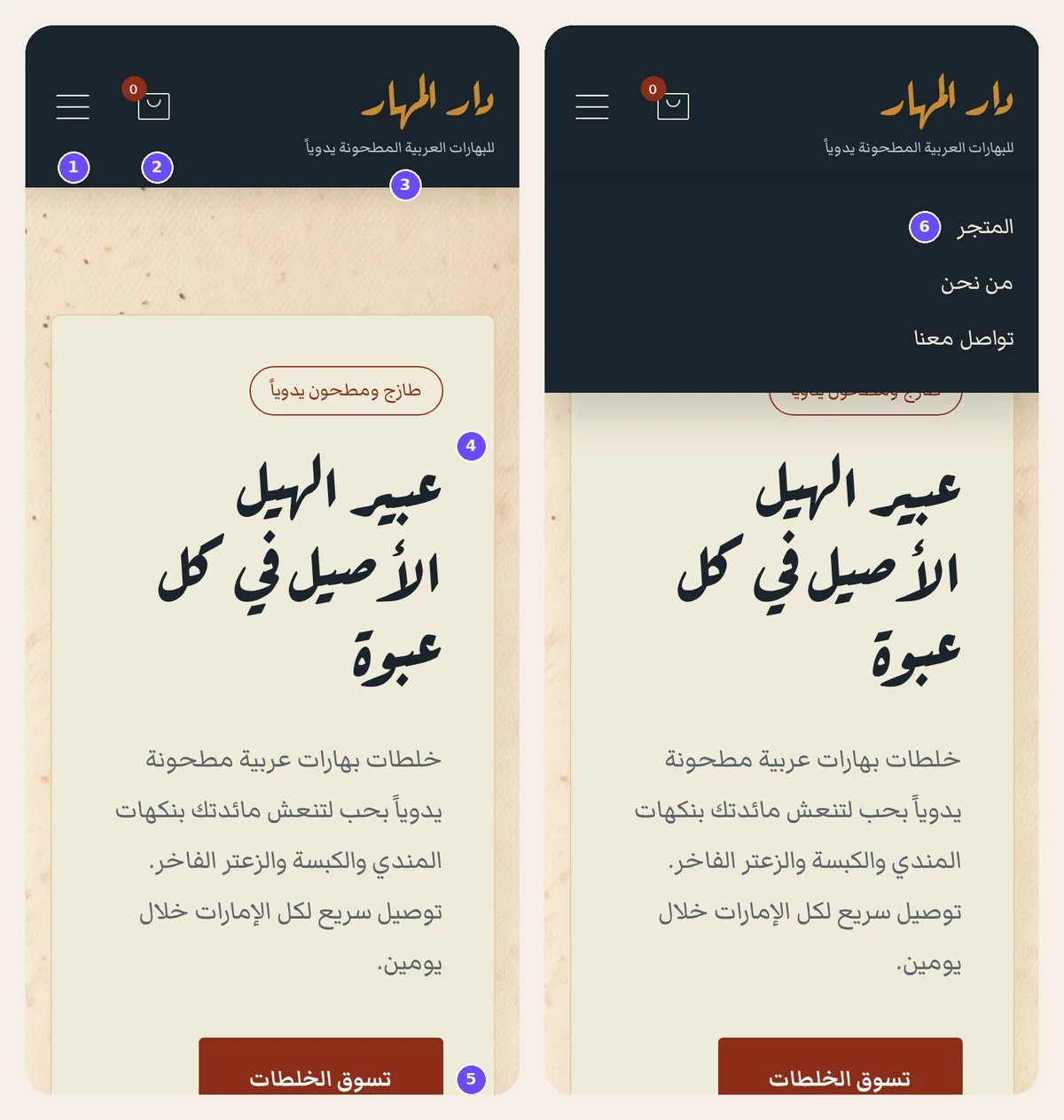
- The menu button sits on the left.
- The cart is next to it.
- The logo and its line of text stay on the right.
- The headline and the paragraphs start on the right.
- The main button is on the right.
- Opened, the menu lists its items from the right edge, in the same order as on the desktop.
Cards, arrows and small controls
Small things give a page away. An arrow that means continue has to point left, because left is where an Arabic reader goes next.
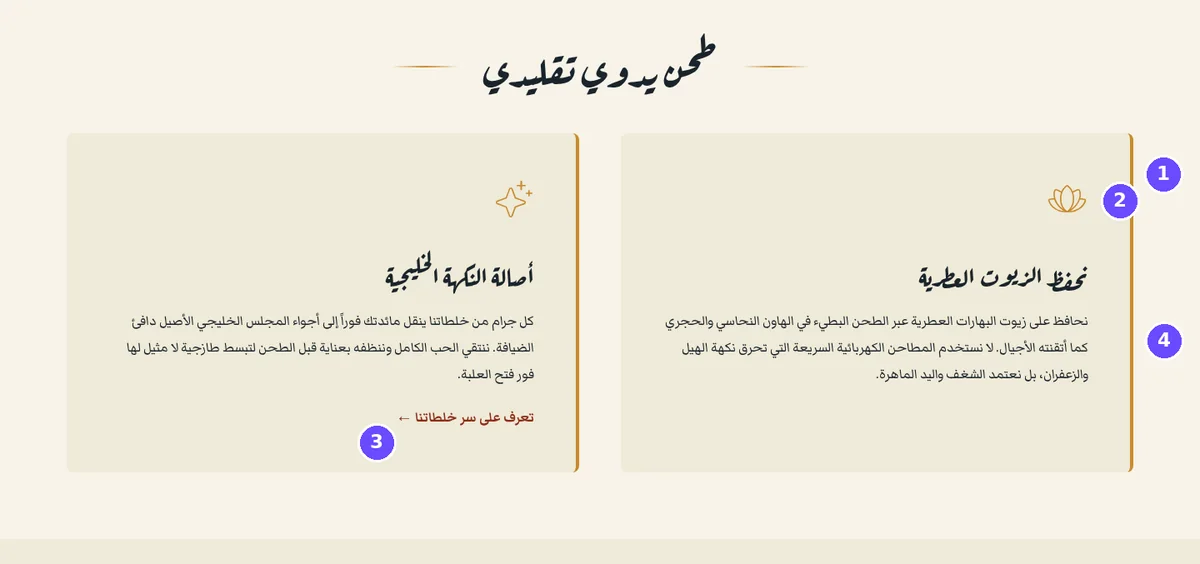
- The first card of a row is the one on the right.
- Its icon and its heading start at the right edge of the card.
- The arrow after the link points left.
- The accent line of the card sits on the start edge, the right.
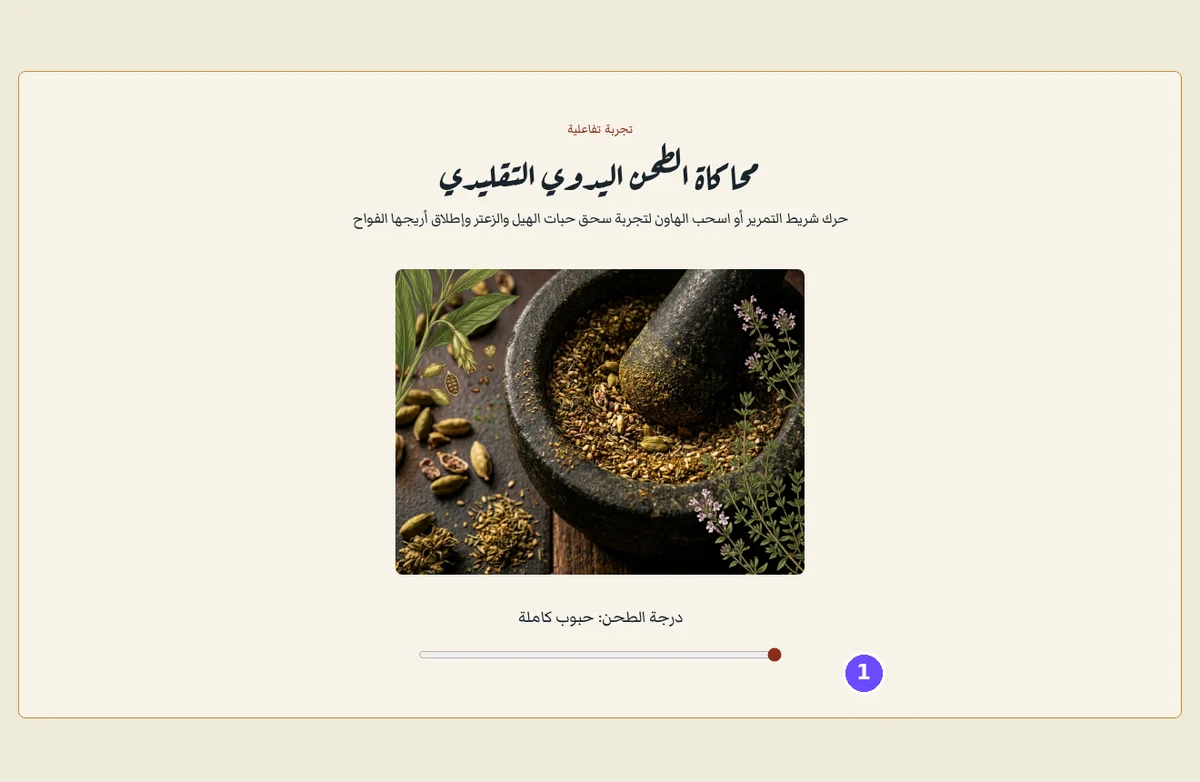
Controls follow the same rule. This slider lets a visitor grind a spice from whole beans to fine powder, and its scale starts at the right.
Products and prices
A catalog is where direction bugs cost money, because this is where visitors decide.
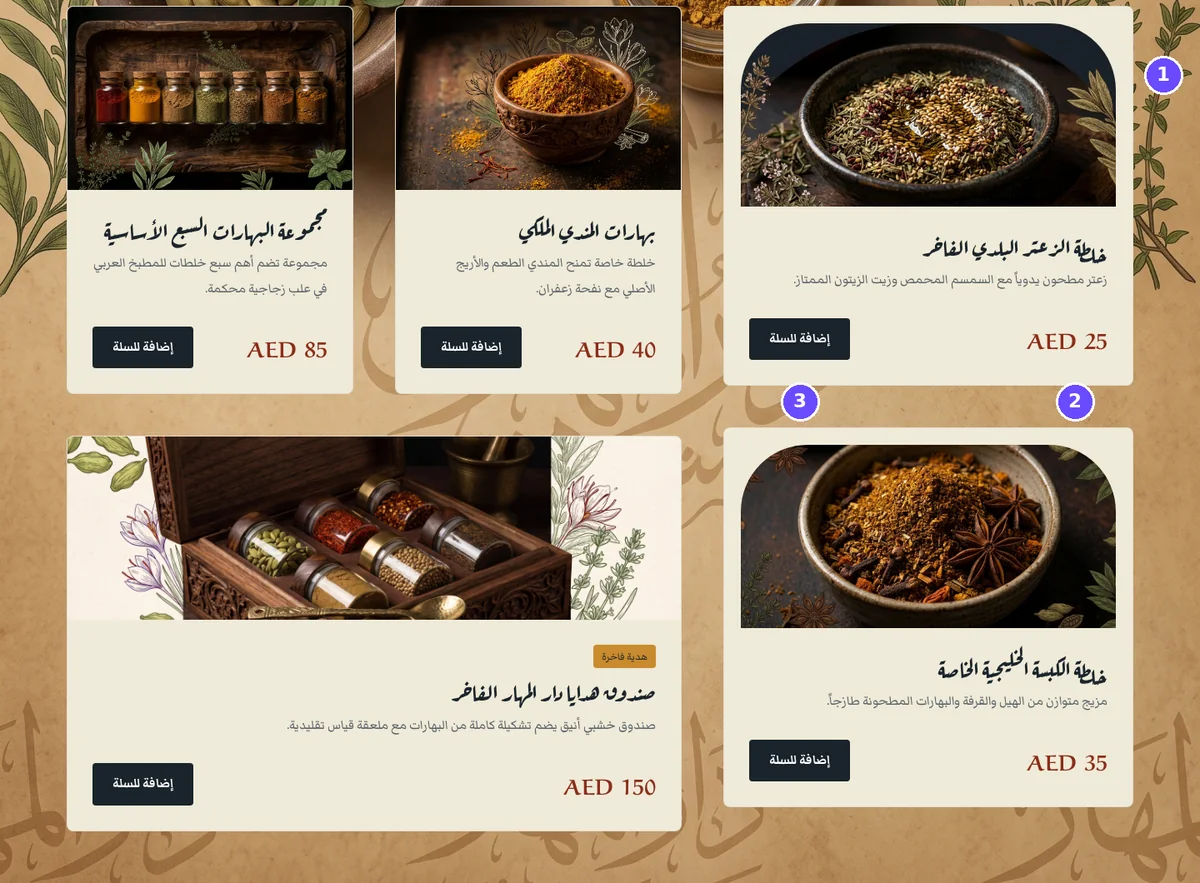
- In a grid the first product is on the right, and the next ones follow to its left.
- The price sits at the right of the row, under the text.
- The add to cart button sits at the left of the same row.
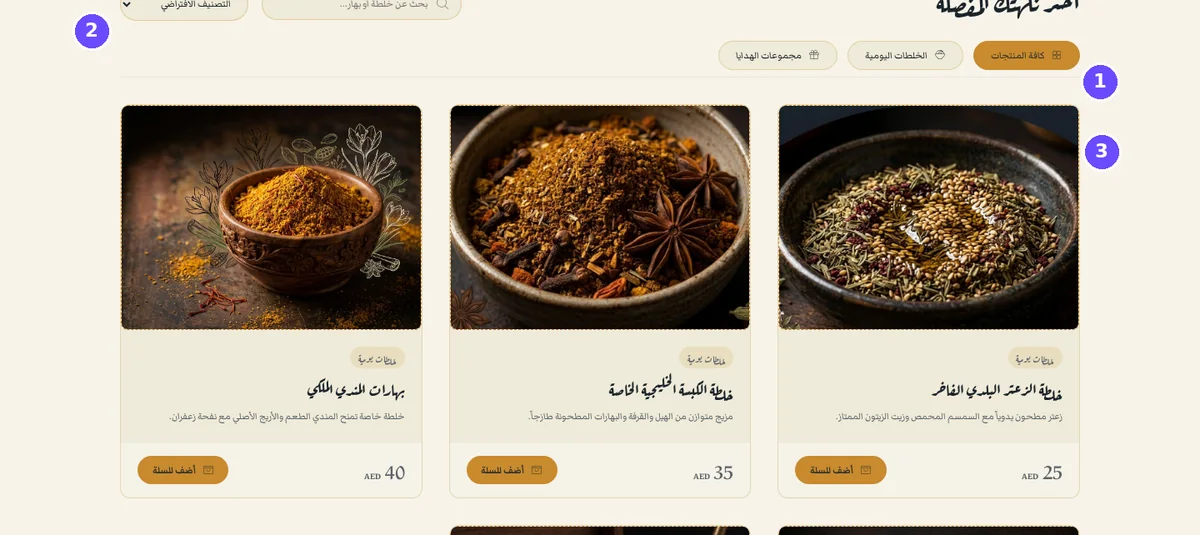
- The first category filter, All, is at the right end of the bar.
- Search and sorting sit at the left end.
- The product grid starts at the right.
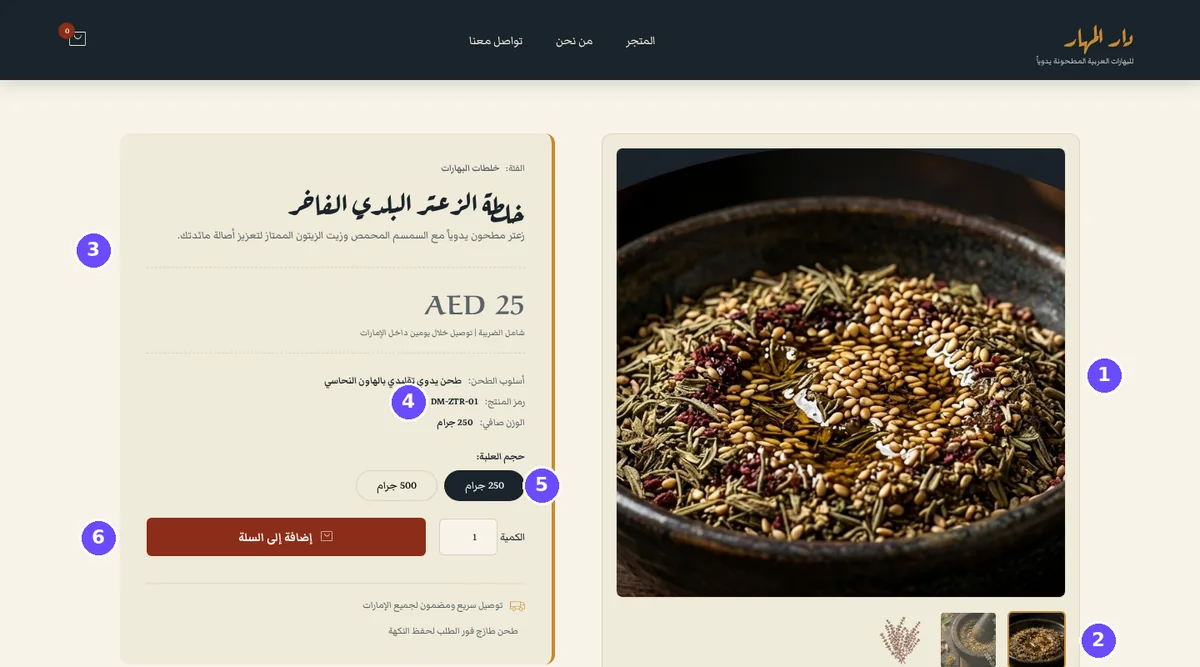
- The photo gallery takes the right column: it is the first thing you see.
- The thumbnails line up from the right.
- The details and the buy box take the left column.
- The product code, made of Latin letters and digits, keeps reading left to right inside the Arabic line.
- The size options start at the right, in the order a reader counts them.
- The quantity field is on the right, and the add to cart button follows to its left.
Prices, product codes and phone numbers are written with Latin letters and digits, and they keep reading left to right inside Arabic text, so a price or a code reads the way it was written. It is the same two columns an English product page has, in the opposite order. That is all mirroring is. Getting it right everywhere is the work.
Reviews and the footer
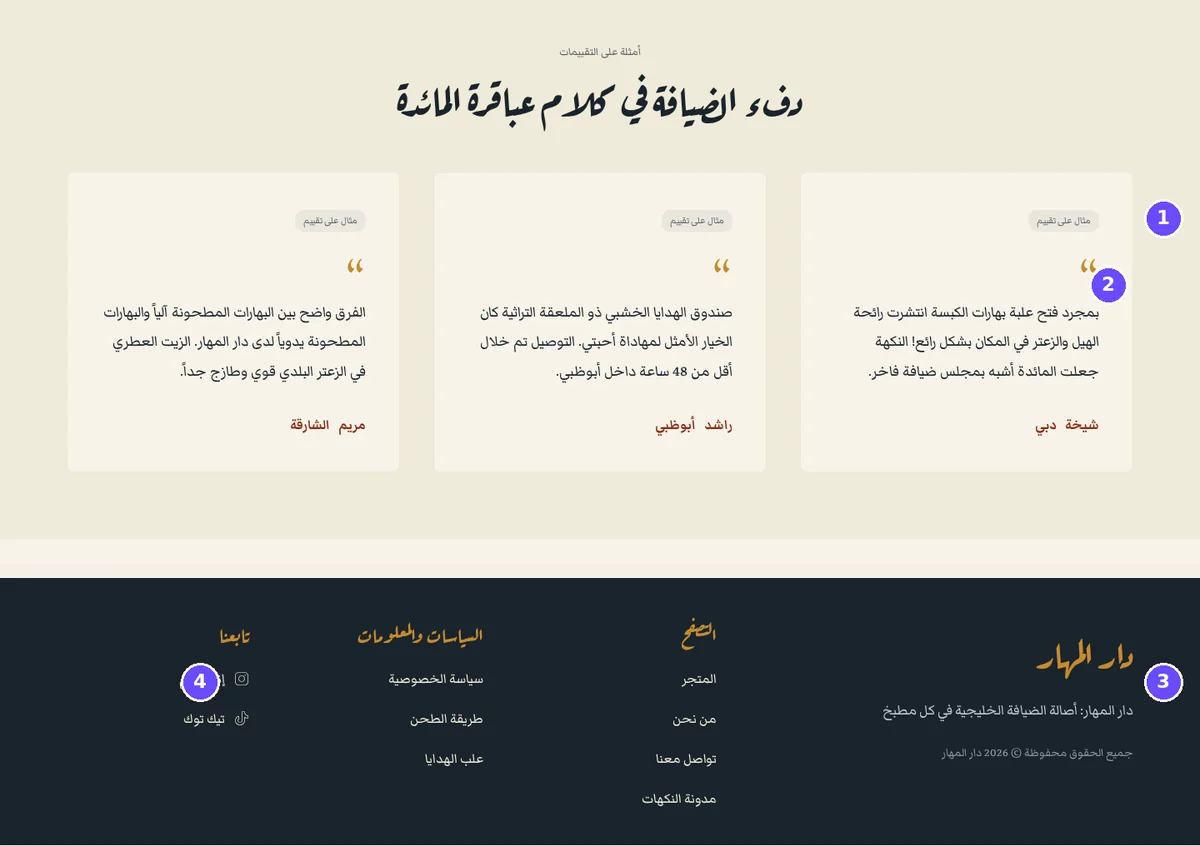
- Review cards run from the right, so the first review is the rightmost.
- The opening quotation mark sits on the right, where the text starts.
- In the footer the brand comes first, on the right.
- The columns follow to its left, and the social links come last.
More phone screens
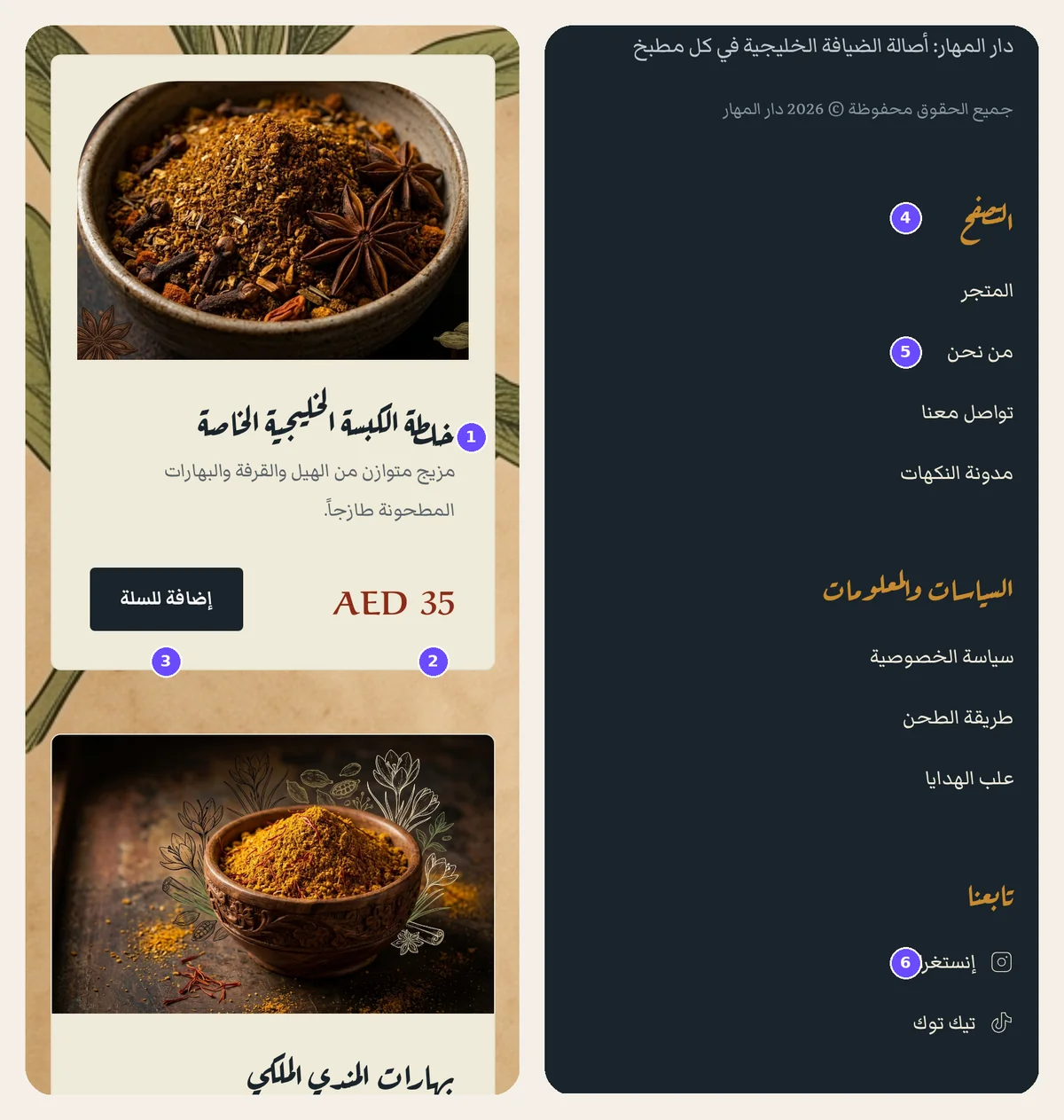
- A product name and its description start at the right.
- The price sits at the right of the row.
- The add to cart button is at the left.
- In the footer, each heading starts at the right.
- The links under it start at the right edge too.
- An icon comes before its name, on the right: the Instagram icon, then the word Instagram.
Persian (Farsi): a calligraphy studio in Hamburg
Persian is written in the Arabic script with four extra letters, پ چ ژ گ, and it has a detail English sites never meet: the half space. Words such as کلاسهای آنلاین (online classes) carry an invisible character inside them that stops the letters from joining where the word should break. The half space is part of the spelling, and WPMaven keeps it exactly where the description puts it.
The sample is Safiran Honar, a calligraphy studio in Hamburg: framed calligraphy, art prints and online calligraphy classes, shipping across Europe, prices in euros. WPMaven built it from one Persian description.
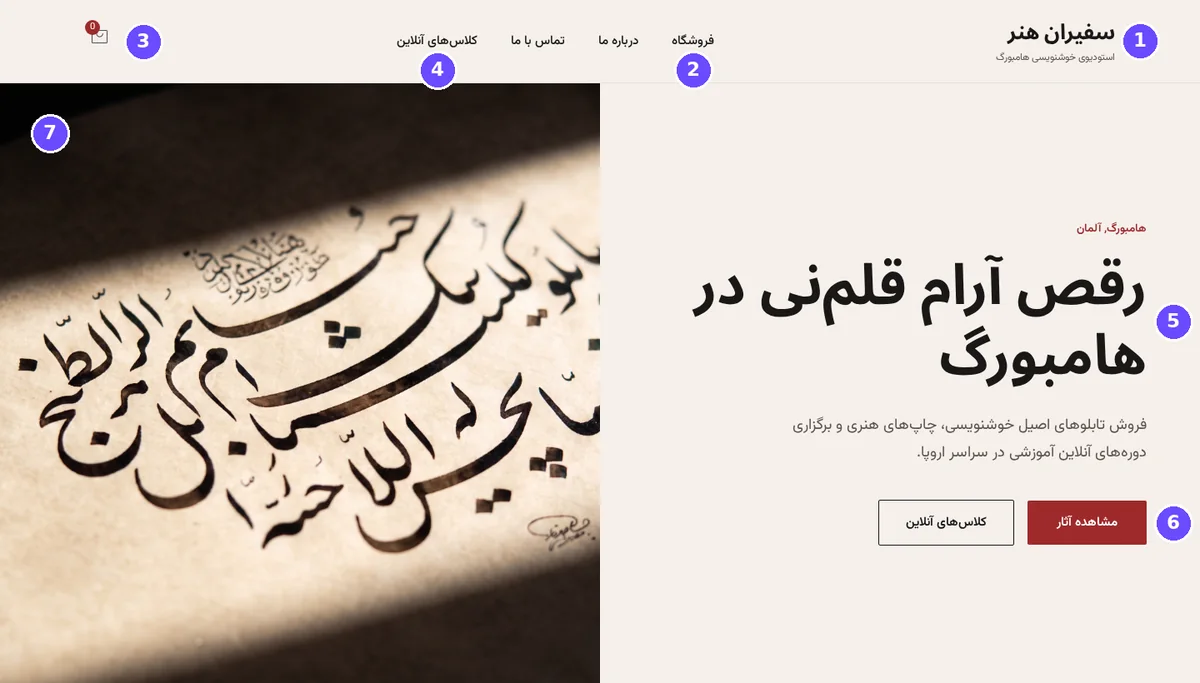
- The brand and its line of text sit on the right.
- The menu starts at the right with فروشگاه (shop).
- The cart sits at the left end of the header.
- کلاسهای آنلاین keeps its half space: the gap inside the word is part of how it is written.
- The headline and the text under it start at the right edge of their column. قلمنی (reed pen) keeps its half space too.
- The main button, مشاهده آثار (see the works), comes first, on the right, and the second button follows on its left.
- The photo takes the left half of the screen.
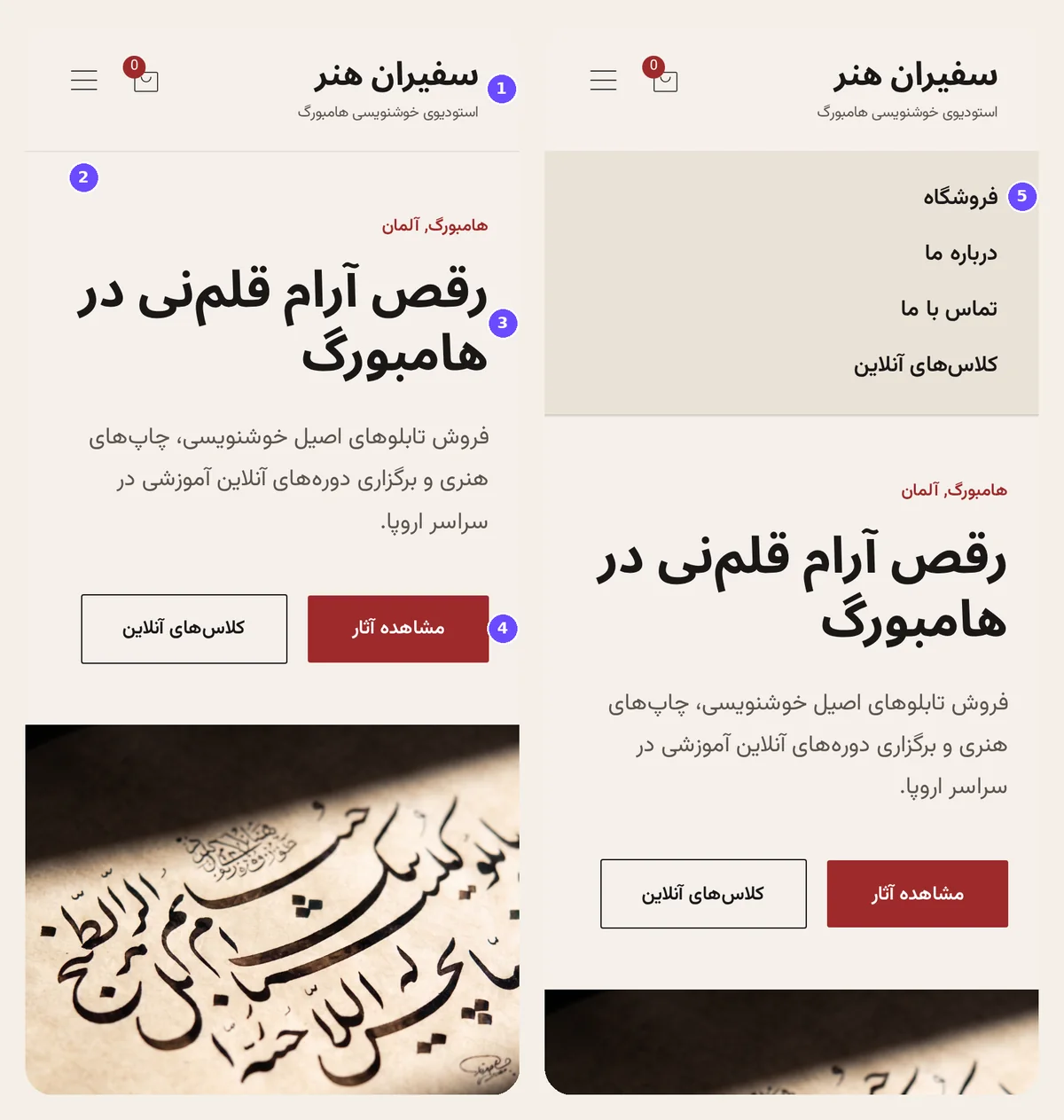
- The brand and its tagline stay on the right.
- The menu button and the cart sit on the left.
- The headline wraps from the right edge.
- The main button is on the right, and the second button follows on its left.
- Opened, the menu lists its items from the right edge.
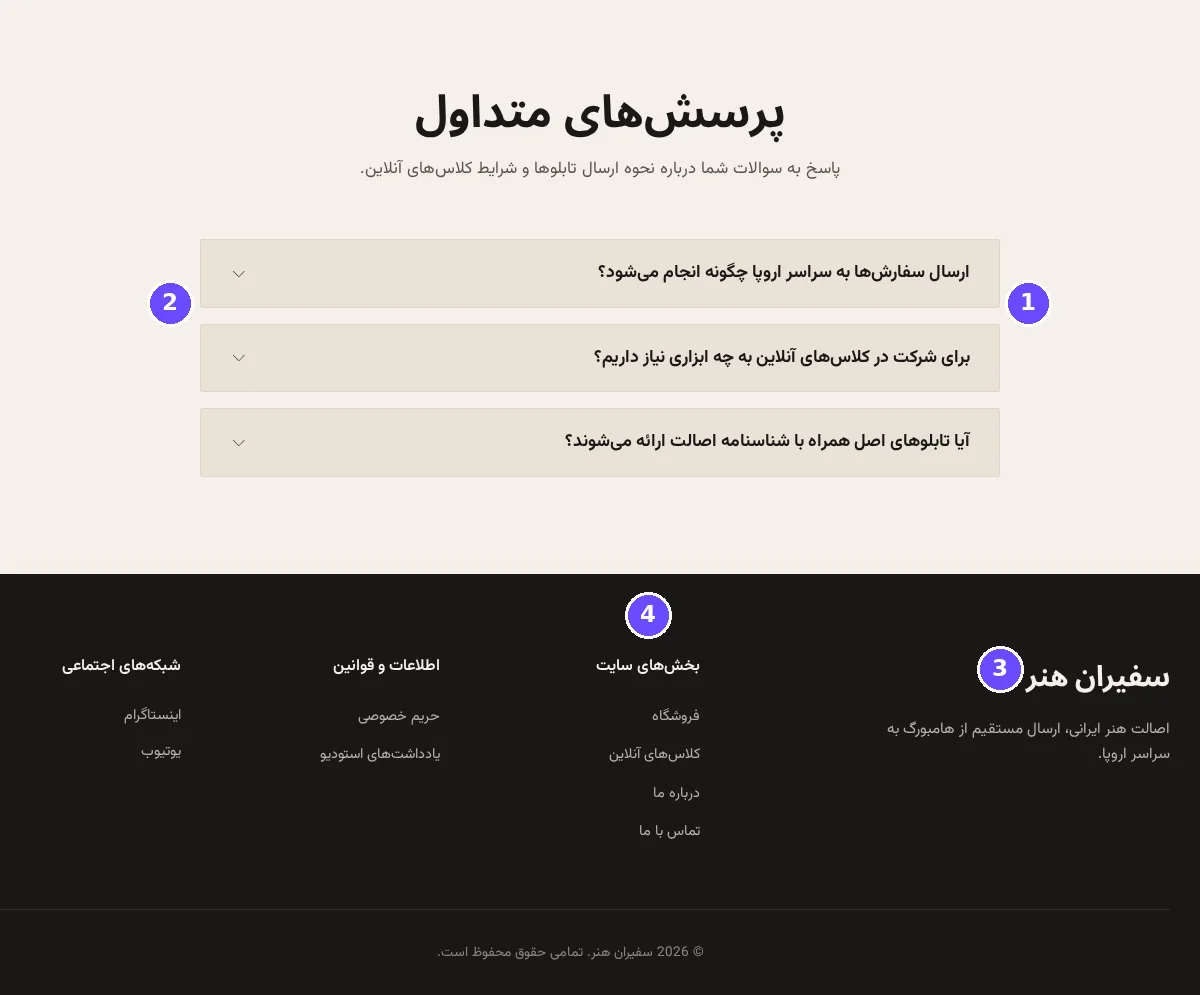
- Each question starts at the right edge of its row.
- The arrow that opens an answer sits at the left end of the row, where the row ends.
- In the footer the brand comes first, on the right.
- The columns follow to its left, each heading starting at the right.
Fonts matter as much as direction here. Persian sites get a face that holds every Persian letter, and the Latin brand names on the same page keep reading naturally beside them.
Urdu: embroidered clothing from Lahore
Urdu is written in Nastaliq, a calligraphic style that slants down from right to left and stacks tall. Its lines need more room than any other script in this guide, so Urdu pages get extra line height in headings and paragraphs, and a display face drawn for the style. In the sample, the steps are numbered in Urdu digits: ۰۱ ۰۲ ۰۳.
The sample is Lahore Resham, an embroidery brand: hand embroidered suits and dupattas, custom tailoring to order, delivery across the UK and worldwide. WPMaven built it from one Urdu description.
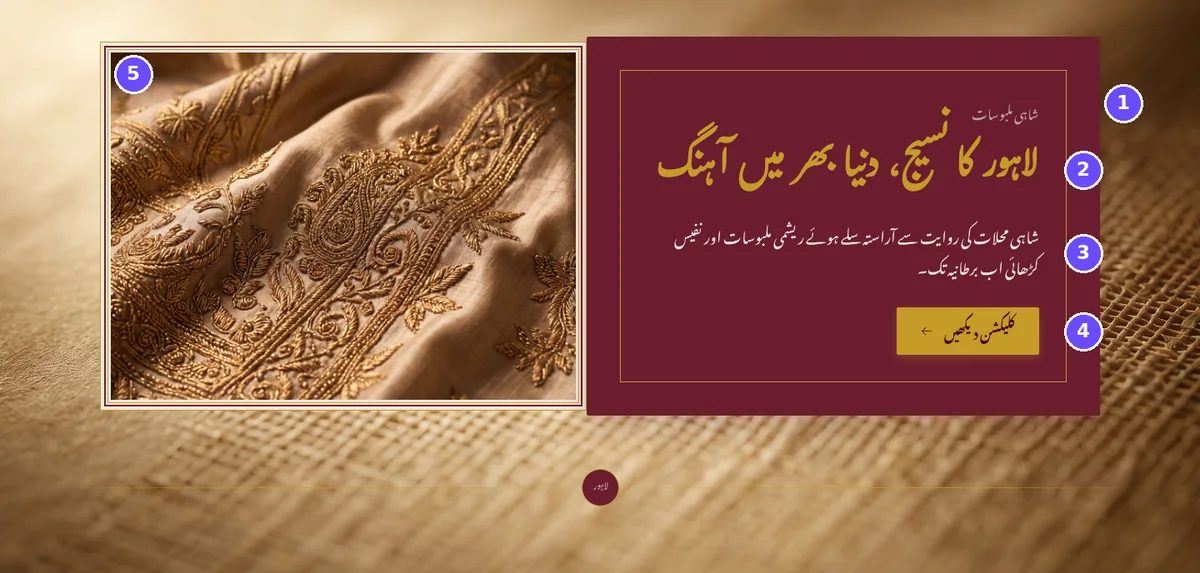
- The text panel is the first column, so it takes the right, and the photo follows on its left.
- The headline is right aligned, in a display face drawn for Nastaliq.
- The paragraph gets double line height, so the tall lines of Nastaliq never touch.
- The arrow in the button points left.
- The photo takes the left side.
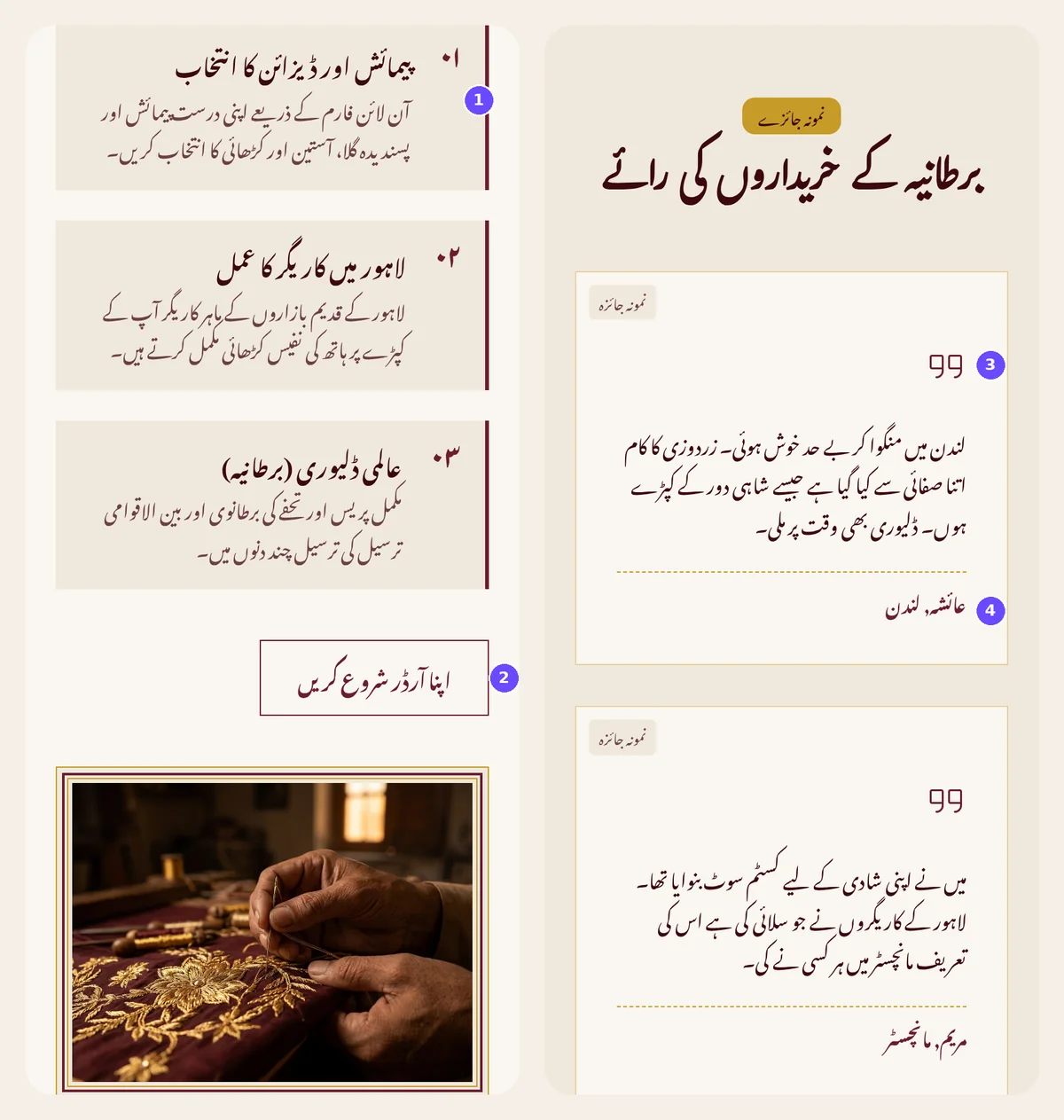
- The step numbers are in Urdu digits, on the right, and the accent line sits on the right edge of each card, the start edge.
- The button is right aligned.
- The quotation mark and the review start at the right.
- The name and the city of the reviewer close the card, right aligned.
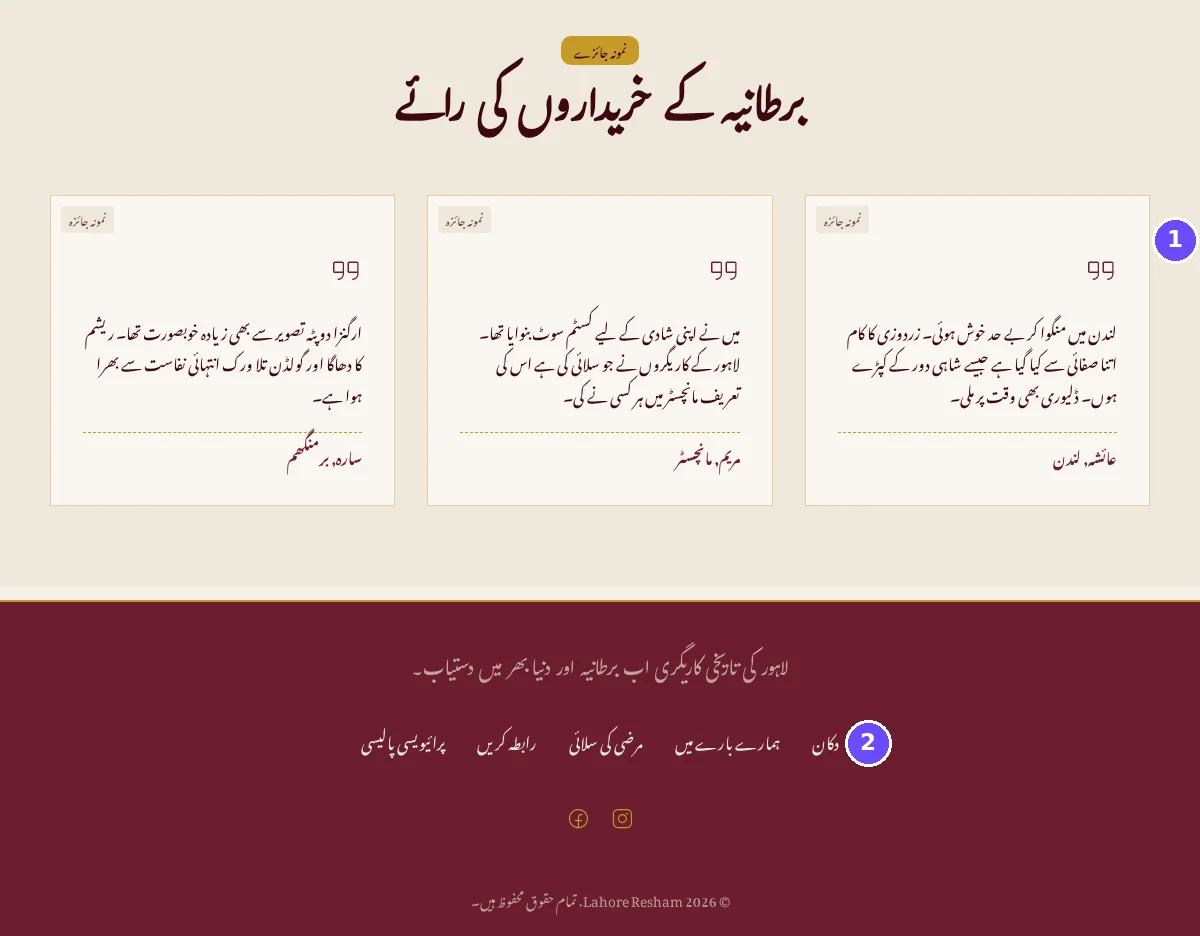
- The first review is the rightmost card.
- In the footer the first link, دکان (shop), is the rightmost.
What must not flip
Mirroring everything is as wrong as mirroring nothing. Some things keep their own direction on purpose.
- Logos. A logo is a drawing with its own shape, not a line of text.
- Photos. A photo is never mirrored, and the point of focus chosen for it stays where it was set.
- Phone numbers, email addresses and web addresses. They read left to right, so the fields that hold them keep that direction inside a right to left form, and a phone number written in groups is held in its own left to right box.
- Code and media players. The controls inside a video player keep their order.
- Digits. A price or a code reads the way it was written.
How every build is checked
Direction bugs hide, because every piece can look right on its own. So the builder measures the page instead of trusting the code, in Hebrew, Arabic, Persian and Urdu alike.
- It renders every page at desktop and phone widths and measures where each block of text starts. Text that still starts at the left of a right to left page is found and repaired.
- Text alignment is written as start and end, never left and right, so it follows the reading direction by itself.
- A stylesheet written the way the page should look is kept as it is, and one written as the mirror image of an English page is mirrored. The classic failure is mirroring twice, which sends the text back to the left, so we read how a stylesheet was written before we touch it.
- The phone header is checked for a menu button pushed off the screen and a bar piled against one edge.
- Forms are measured as well, and the fields that hold phone numbers, email addresses and web addresses keep their own direction.
- Every stylesheet of the site has a right to left twin, and it loads whenever the site reads that way.
- The fonts carry the letters. Hebrew, Arabic, Persian and Urdu sites get faces that hold every letter of their script, and Urdu gets the extra line height its Nastaliq style needs.
The words a site prints by itself, such as add to cart, quantity, search and page numbers, come in 28 languages, four of them right to left. The same direction rules apply to every other language written in a right to left script, such as Yiddish, Pashto and Sorani Kurdish.
Questions business creators ask
Can I create a business in Hebrew with WPMaven?
Yes. WPMaven is more than a Hebrew website builder: describe your business in Hebrew, in a sentence or two, and WPMaven creates it, with its site, its pages, its products or workshops and the words around the checkout, all in Hebrew and reading from right to left. The Tel Aviv sample in this guide was built from one Hebrew description.
Can I mix English brand names into a Hebrew site?
Yes. A brand name in Latin letters sits inside a Hebrew line the way it does on the Tel Aviv sample, and prices, product codes and phone numbers keep their own left to right order.
Does WPMaven also build in Arabic, Persian and Urdu?
Yes. Arabic, Persian and Urdu sites read from right to left from the first screen to the last, with fonts that carry their letters. This guide shows a real build in each of the four languages.
Do I need to know how right to left layout works?
No. You describe your business. WPMaven sets the reading direction, lays the page out from the right, picks fonts for your script and checks every page at desktop and phone widths.
Will my site work on a phone?
Yes. The builder checks the header at phone width on every build: the menu button must be on screen, the open menu must sit fully inside it and it must close again.
Does everything on the page flip, even photos and logos?
No. Logos, photos and media players keep their own direction, and so do phone numbers, email addresses and web addresses. Only the layout and the flow of text follow your language.
Which other right to left languages follow the same rules?
Yiddish, Pashto and Sorani Kurdish read from right to left with the same direction rules, and the words a site prints by itself, such as add to cart and search, come in 28 languages.
How do I start?
Open WPMaven, describe your business in your own language in a sentence or two, and watch the first screen get built, free. It reads from the right.
Five checks before you launch
- Read the home screen aloud, or ask a native reader to. A line that sounds awkward usually looks awkward too.
- Open the site on a phone and use the menu with your thumb.
- Look at every place where Latin letters meet your language: brand names, product codes, email addresses. They should sit naturally in the line.
- Check prices, quantities and dates. They should read the way your customers write them.
- Share the site with a native reader you trust and ask how it feels to them.
Try it in your language
If your business speaks Hebrew, Arabic, Persian or Urdu, describe it in that language and look at the first screen it builds. It will read from the right. Describe any business, and WPMaven creates it, runs it and grows it, in the language your customers read.
Once it exists, set your first price with a method instead of a guess.
Alfonso García Frey
Founder, WPMaven
Have a business in mind?
Describe it in one sentence, in Hebrew, Arabic, Persian, Urdu or any other language, and watch it get built, free. Then $1 for your first week, one time only.
Build my business free